
QPlant Estimator
Capital cost estimating built around your project.
QPlant estimates the capital cost of process facilities, pipes and pipelines, from first concept through FEED. Arrange your project on a canvas and QPlant prices the equipment, piping, structures, indirects, escalation and risk as you work.
Built for
Process plants, facilities and pipelines
Delivers
A Total Installed Cost with a P10 to P90 range, carried from first concept through detailed design
Starts from
A canvas layout, simulator cases, Excel lists, and imported files
Outputs
Excel workbook, PDF executive report, Code of Accounts, and equipment details, all flexible and fully customizable
Runs on
Your own Windows desktop, fully local. Project data never leaves your machine
Units
Metric or imperial, with currency switching that updates every figure
How an estimate comes together
Five steps from a new project to a signed-off estimate.
The workflow is the same whether you start from a sketch, an imported file, or a simulator case.
Start
Start with as little as a rough layout, or import your own files, simulator case, or equipment list.
Configure
Place and connect equipment on the canvas. QPlant routes and sizes the pipes.
Review
Open the dashboard: Total Installed Cost, estimate class, range, and the main risk drivers, all in one view.
Refine
Adjust labour rates, productivity, allowances, and escalation, or override any of them, and watch the range tighten as the detail improves.
Deliver
Export an Excel workbook and a PDF executive report, ready to put in front of a client, a bid committee, or your board.
Inside QPlant
From concept to sign-off, in one seamless workflow.
The core capabilities in estimating, brought together in one platform, so the layout, quantities, costs, and reports stay in step rather than in a fragmented workflow.
01 · The Visual Canvas
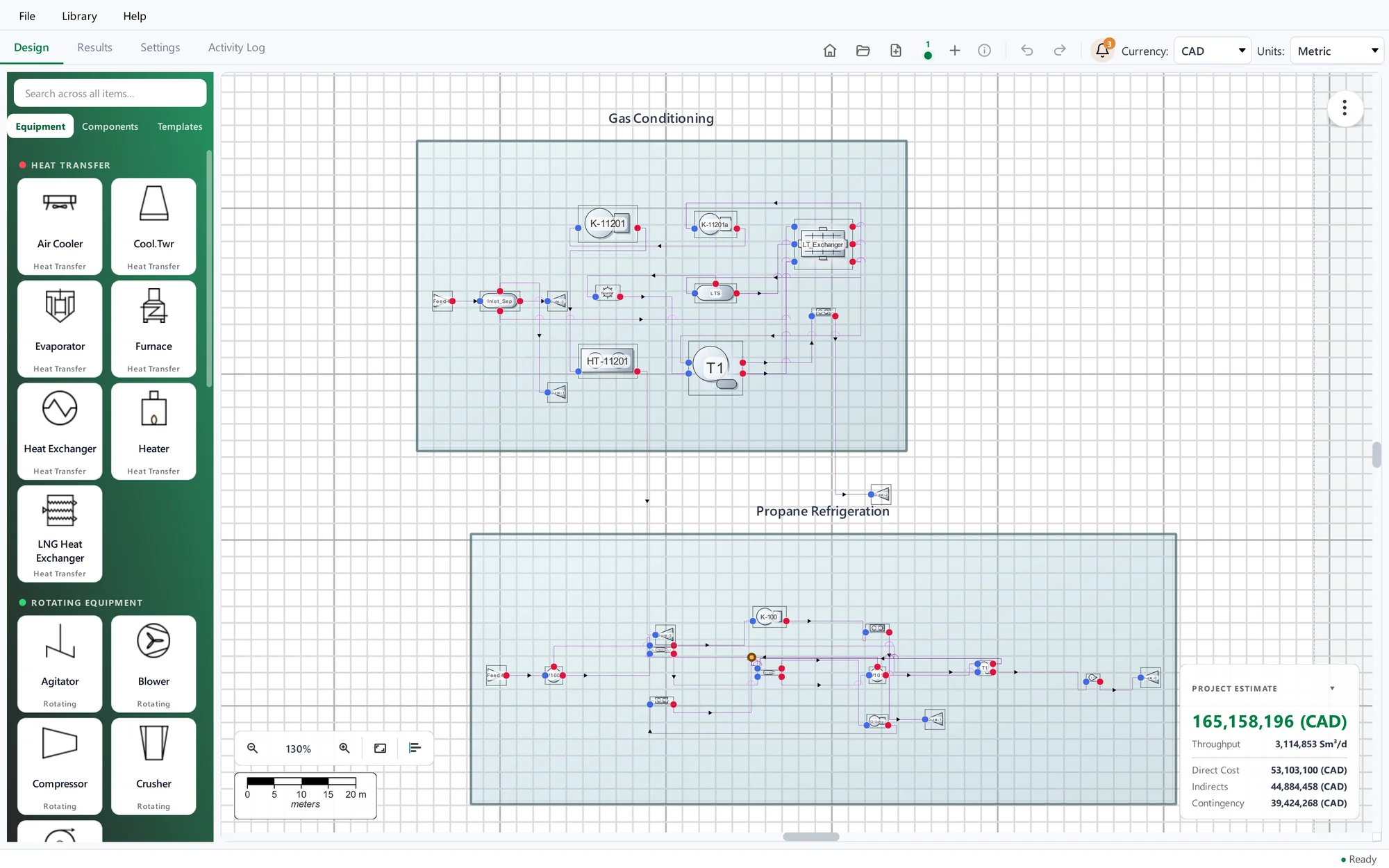
Arrange the project on a canvas.
Build it the way you think about it. Areas, modules, steel structures, buildings and equipment are drawn to scale, so the layout itself drives the cost.
- Equipment classes, each with their process configurations and fully specified equipment variants, plus structures, pipe racks, buildings and column packages with their satellite equipment
- A live estimate card that updates as you work, keeping cost visible throughout
- A single slider tightens the layout, and equipment can be easily rotated to fit the site or brief
02 · Intelligent Automations
Built to keep pace with your project.
Connect two items and QPlant routes the line, sizes it, adds the fittings, and generates the ancillary lines and instruments.
Information propagates through the network as you work, so attached equipment, connections, and costs follow automatically, and collisions or missing connections are flagged while you work.
- Pipes route through racks and around collisions, with rack capacity checked as they go
- Flow is calculated across the connected network, so changing one item updates everything connected downstream
- Fittings, valves and instruments are calculated for you
- Attached equipment, ancillary lines, and direct costs are added automatically when you place an item
03 · Advanced Importer
Start from what you already have.
Bring in drawings, mechanical equipment lists and process simulation cases. The importer keeps a record of where each item came from and flags anything it cannot trace.
- Leading process simulator cases (XML, Vsym, JSON)
- Excel, CSV, equipment lists, and pipe MTO pricing
- PDF, DXF, DWG and DEXPI drawings, with OCR for scans — in refinement
- A preview lets you check and adjust before the import is complete
04 · QIntelligence
Your AI copilot, there when you need it.
Ask QIntelligence to review the layout, size equipment, check the estimate, add or connect items, or generate a model from a design basis.
QIntelligence works from your actual project data and can run locally so your data stays in-house.
- Ready-made prompts such as Review my estimate to get you started quickly
- Attach an equipment list and QIntelligence reads it, pulling the items straight into your project
- Ask for financials, request project data, or make changes, all in plain natural language
- QIntelligence explains its reasoning and asks for approval before it acts, so you stay in control throughout. Output is AI-generated and needs engineering review.
05 · Estimation Engine
The engine behind the number.
Give QPlant the basics and built-in defaults fill the gaps: regional labour and productivity, allowances based on estimate class, escalation, indirects and owner’s costs.
Behind that sits a costing engine that prices equipment from trained AI models, derives an AACE class automatically, and builds one traceable Total Installed Cost.
- Equipment and piping costed in detail, from process duty through to material, diameter, and pressure rating
- Costs adjust to your location, using local productivity data, regional indexing, and separate escalation for material and labour
- A completeness check flags where the project stands and warns if the accuracy you are claiming is not supported
- Bring your own Cost Library and cost index, or build custom cost models for additional equipment
06 · Results and reports
The detail behind the number, ready to present.
Reporting is flexible and fully customizable, so the same figures serve a technical review and an executive briefing.
- Code of Accounts customized to your client’s codes
- Cost build-up, area comparison, accuracy band, and risk tornado, all in one view
- A full report pack in minutes, with a styled Excel workbook and a PDF executive report
- Reporting that is tailored to its audience, with detailed cost estimates, equipment lists, executive summaries, and the choice of what each one includes
Optional add-on · Industry Benchmarking
Know where your estimate stands, before anyone asks.
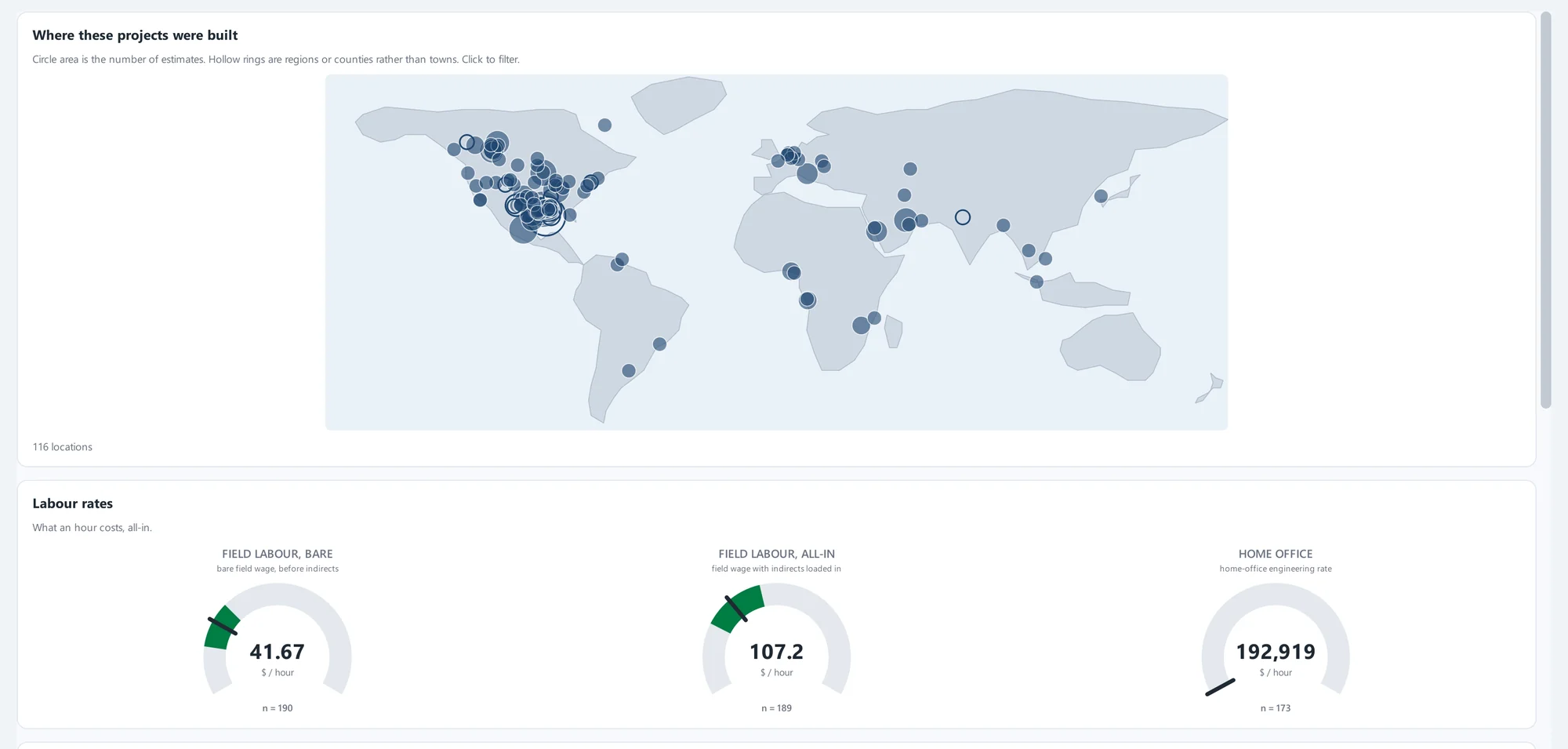
Industry Benchmarking shows how your estimate compares with completed projects, so your numbers hold up in the market and get trusted sooner. Run it yourself in QPlant, or hand us your project data and we’ll benchmark it for you.
- Build trust. Show clients, reviewers and management that your estimate is in line with the market.
- Catch problems early. Spot a number that looks off while there is still time to check it.
- Bid with confidence. Back your price with evidence from completed projects.
- Bring us in. Our team can benchmark your project for you and walk you through the results, so you get the comparison and what it means.
An optional add-on to QPlant. Ask us how it fits your licence.
Security and privacy
Your project data stays in your hands.
QPlant keeps your project and cost data on your own computer, with protection built into how it is stored and shared.
Your projects stay on your computer
QPlant runs on your Windows desktop, and your projects are stored on your own machine rather than on a shared online service.
Encrypted project data
Project data is encrypted on disk, and the project files you save, share, or back up are encrypted too.
Protected activity logs
Application logs are encrypted and kept separate from the program files, so troubleshooting records are protected too.
AI that can stay on your machine
With QIntelligence, the AI assistant runs on your own computer, so your prompts and your design stay on that machine.
Private error reporting
Before an error report is prepared, QPlant removes personal details such as your Windows user name and your project file locations.
Usage statistics, not project content
Any usage statistics describe which features are used, never what is inside your project.
Every organization has its own security requirements. If your IT or security team has questions, talk to us and we will answer them.
450+
fully specified equipment variants on the canvas, plus pipe racks, structures and buildings
P10 · P50 · P90
the low, likely and high outcomes for your cost, so you see a range and not just one number
Works from a rough layout
A defensible estimate from the outset, refined as the project takes shape.
One workspace
Configure, price and report in the same place, without re-entering data between tools.
Where QPlant is used
Capital-intensive industries, from first concept to bid.
Energy and resource
Oil and gas, oilfield services, clean energy and carbon capture, LNG, power generation, and mining and minerals.
Manufacturing and processing
Petrochemicals, chemicals and biofuels, industrial gases, fertilizer, and pulp and paper.
Fabrication and construction
Field fabrication, shop and module fabrication, marine and offshore, and life sciences and pharmaceuticals.
See QPlant on a project like yours.
Tell us what you are estimating, and we will set up a live demo, online or in person.